输入输出的其他知识
控制精度
保留 2 位小数点
#include <cstdio>
printf("%.2lf", x);

#include <iomanip>
cout << fixed << setprecision(2) << x;
cout 默认 输出 6 位精度


控制域宽
占 8个字符宽度,
printf("%8d", a);  // 靠右
printf("%-8d", a);  // 靠左

cout << setw(8) << x << setw(8) << x;  // 靠右
cout << left << setw(8) << x << left << setw(8) << x;  // 靠左
默认靠右
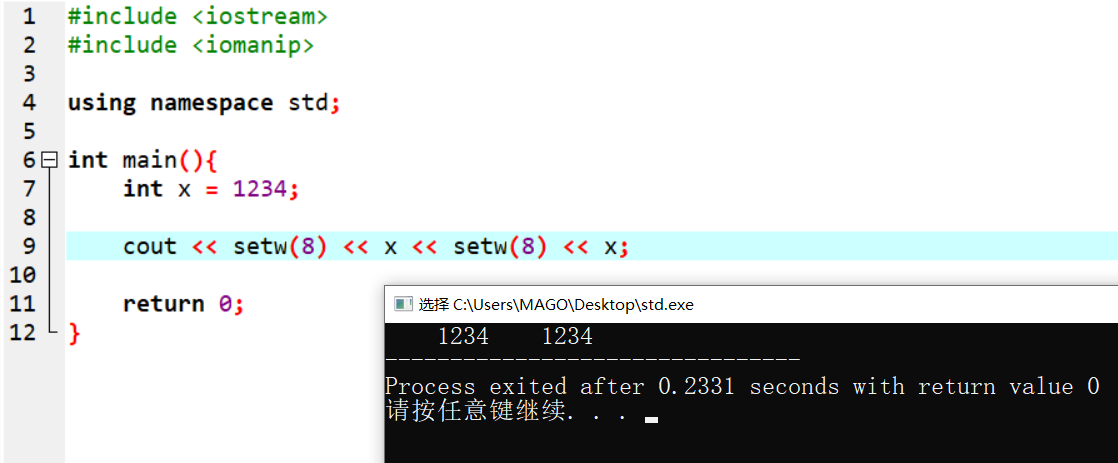
强制靠左
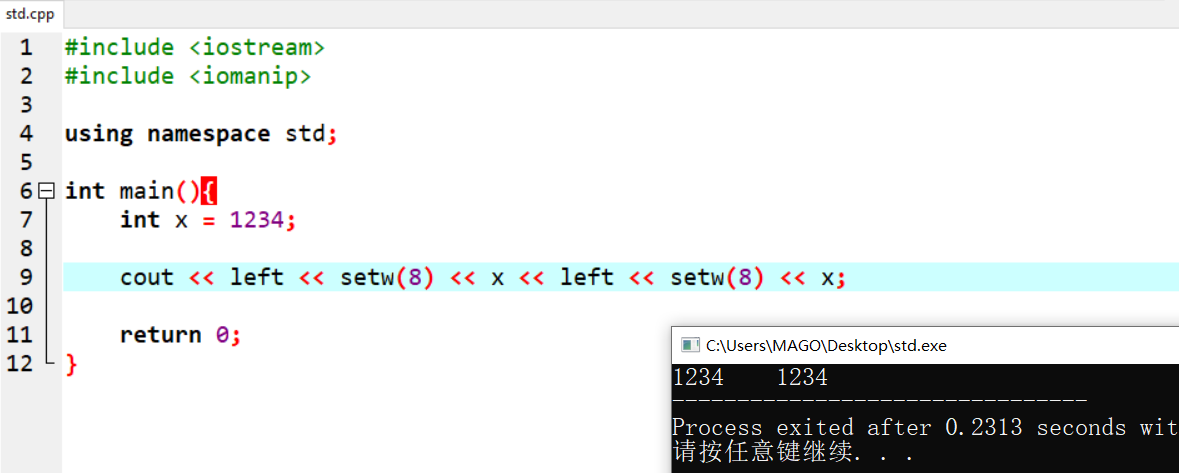
使用 setw 操作,需要包含头文件 iomanip
setw,代表 set width iomanip,io 代表输入输出,manip 是 manipulator(操纵器)的缩写
从文件输入输出
// freopen一定是在复赛前,非常熟练使用,主要是调试要熟练
// 从文件输入输出,还有别的写法,但下面这个写法就稳过好记
freopen("1.in", "r", stdin);
freopen("1.out", "w", stdout);
输出换行符

cin cout的加速,当输入输出超过1e5
当输入次数达到1e5的时候,需要开启加速
或者换成scanf, printf
但只要开了加速,就只用cin, cout,不要cin, scanf混用
sscanf,从字符串里,按指定格式把数据读出来
// 这个在关键的时候,可以救命
// 比如,《网络连接》这道题目,读入 a.b.c.d:e 的格式,判断合法性
// 正常做,也是可以的,读入字符串,然后一个一个拆。
// 但是,情况非常多,非常考验代码能力
// 如果有了 sscanf,就是入门题了
scanf("%s", s);
a = -1, b = -1, c = -1, d = -1, e = -1;
sscanf(s, "%d%c%d%c%d%c%d%c%lld", &a, &dot1, &b, &dot2, &c, &dot3, &d, &dot4, &e);
#include<stdio.h>

int main() {
    char ar[20] = "User M 19 1.85";

    char str[10];
    char ch;
    int i;
    float f;

    sscanf(ar, "%s %c %d", &str, &ch, &i, &f);

    printf("The value in string is : %s ", str);
    printf("\n");

    printf("The value in char is : %c ", ch);
    printf("\n");

    printf("The value in int is : %d ", i);
    printf("\n");

    printf("The value in float is : %f ", f);

    return 0;
}

// 输出
The value in string is : User
The value in char is : M
The value in int is : 19
The value in float is : 1.850000
sprintf,按指定格式,写到字符串里
#include<stdio.h>

int main(){
    char target[20];

    char name[10] = "Andrea";
    char gender  = 'F';
    int age = 25;
    float height = 1.70;

    printf("The name is : %s", name);
    printf("\n");
    printf("The gender is : %c", gender);
    printf("\n");
    printf("The age is : %d", age);
    printf("\n");
    printf("The height is : %f", height);

    sprintf(target, "%s %c %d %f", name, gender, age, height);

    printf("\n");
    printf("The value in the target string is : %s ", target);

    return 0;
}

// 输出
The name is : Andrea
The gender is : F
The age is : 25
The height is : 1.700000
The value in the target string is : Andrea F 25 1.700000
stringstream,把字符串,当成输入输出流来用
有两个核心作用:
一是:从字符串里读数据
二是:把多个内容拼成字符串
从字符串里读数据
你想把里面的数字拆出来。
就可以写:
#include <sstream>
using namespace std;

string s = "123 45 6";
stringstream ss(s);

int a, b, c;
ss >> a >> b >> c;
cin 是从输入流读,stringstream 是从字符串流读。
把多个内容拼成字符串
最后:s 中的内容是 "2026-3-20"
这就相当于把很多内容“流式地拼起来”。
4 个常用操作:
1. 建立字符串流
stringstream ss(s);
表示拿字符串 s 来创建一个流。
或者:
stringstream ss;
先建一个空流。

2. 用 >> 读数据
ss >> x;
ss >> word;
表示从字符串流里取出内容,按类型读进变量。

3.用 << 写数据
ss << 123 << " abc";
表示往字符串流里写内容。

4.用 str() 取出最终字符串
string s = ss.str();
它表示:把当前流里的内容取出来,变成普通字符串。
参考
C - sscanf() and sprintf() - Decodejava.com